PSPaystubs StudioCreate My Paystub →
SIMPLE. PROFESSIONAL. READY WHEN YOU ARE.

Create Your Paystub.
Download Your PDF.

Use this online paystub generator to prepare a personalized earnings statement PDF from accurate payroll information. Review your details before paying $3.99 to download your PDF.

✓ One PDF template✓ Review before checkout✓ One-time payment
CO.   FILE   DEPT.   CLOCK   VCHR. NO.
YOUR COMPANYCompany address · City, State ZIPEmployee ID: EMP-0104

Earnings Statement

Period Beginning:Oct 01, 2026

Period Ending:Oct 15, 2026

Pay Date:Oct 16, 2026

Jordan TaylorEmployee address · City, State ZIP
EarningsRateHoursAmountYear to Date
Regular$30.0080.00$2,400.00—
Gross Pay$2,400.00—
Deduction Statutory
FICA - Medicare−$34.80—
FICA - Social Security−$148.80—
Federal Tax−$240.00—
State Tax−$85.00—
Net Pay$1,891.40—
YOUR COMPANYPay statement summary
Advice Number:Illustrative onlyPay Date:Oct 16, 2026
SAMPLE · NOT OFFICIAL
✦Professional earnings statementIllustrative data · not a real pay record
⌁Simple step-by-step flowOnly enter what you need
▤Review your detailsCheck totals before printing
↗Download after paymentVerified PDF unlock
ONE-TIME PDF

Create your paystub

Enter accurate payroll information, review your statement, and pay once to download one PDF.

1 Company2 Employee3 Pay details4 Earnings5 Review
01

Company information

Enter the company details exactly as they appear in your records.

Fields marked * are required.
02

Employee information

Enter the employee's details as shown in their records.

03

Employment & pay period

Choose the pay settings and enter the dates for this statement.

Employment and tax settings
Advanced tax settings (optional)

You can leave this section closed for a basic paystub. Only change these settings when they match the employee’s current W-4 or verified payroll records. These options can affect withholding calculations.

Multiple jobs or a working spouse can change federal withholding. This adjustment is not supported yet, so estimates for those situations may be incomplete.

Review all tax estimates against official payroll records. Not every employee needs additional W-4 adjustments.

Pay period
Fields marked * are required.
04

Earnings & deductions

Enter earnings and deductions supported by your payroll records.

Enter the actual hours included in this paycheck. For example, a biweekly paycheck commonly includes 80 regular hours. Regular gross pay is hourly rate × hours entered. Add overtime, bonuses, and deductions only if they apply.

Withholding and deductions
Automatic tax calculation

Paystubs Studio calculates federal income tax and employee payroll taxes from the earnings and withholding settings. State withholding is determined by the employee's state and its applicable rules; do not enter tax amounts manually.

Tax calculations use the selected state and available payroll rules. The app will not guess missing state tax amounts.

Other deductions

Do not enter federal, Social Security, Medicare, state income tax, or mandatory state payroll taxes here. Paystubs Studio calculates supported statutory taxes automatically. Enter only a verified employee-specific deduction not already included in the automatic tax calculation, such as an insurance premium or retirement contribution.

Verified year-to-date totals (optional)

Enter verified year-to-date totals from before this paycheck. New York employees who have prior YTD wages must enter the actual YTD Paid Family Leave withheld amount to apply the annual cap. Social Security and Additional Medicare use prior YTD gross wages to apply annual thresholds. Leave unknown historical amounts blank.

ⓘ

Automatic withholding. Tax amounts shown are estimates, not a guarantee of your tax liability. Review all figures against official payroll records before using the document.

05

Review your statement

Review names, dates, earnings, and deductions carefully before continuing.

Your download link appears only after Plisio confirms payment. Returning from checkout does not count as payment confirmation.

PDF

Secure checkout and downloads

Introductory pricing: a one-time $3.99 payment is required. Your PDF unlocks only after Plisio confirms payment.

Complete the form and confirm your payroll details to continue.

THE PAYSTUB TEMPLATE

A clearer view of your pay.

Prepare an earnings statement with your company details, pay period, earnings, and deductions.

$3.99One PDF
Create My Paystub →

Review your information and unlock one PDF for the $3.99 introductory price after payment is verified.

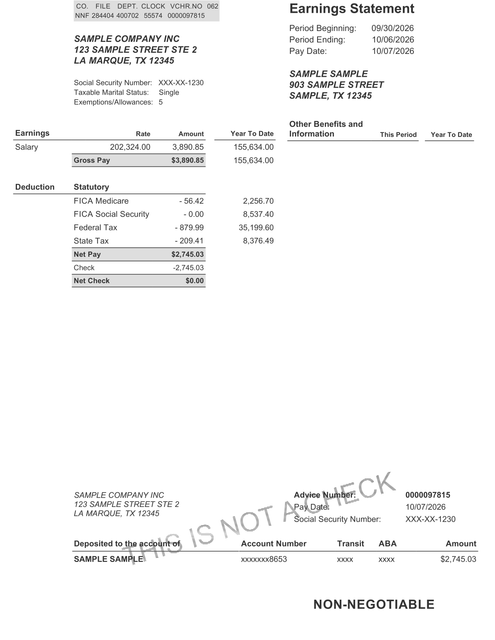
Your Paystubs Studio sample template · Tap to enlarge
Enlarged Paystubs Studio non-ADP earnings statement and check-stub template sample

The preview uses illustrative sample values. Your PDF will use the payroll information you enter. This template does not verify employment or income.

WHAT YOUR TEMPLATE COVERS

Designed around the details that matter.

01
⌁

Earnings & deductions

Organize regular pay, additional earnings, taxes, and other deductions in one statement.

02
▤

Pay-period details

Include company and employee information, pay-period dates, and pay date.

03
$

Gross & net pay

See gross earnings, entered deductions, and net pay together in one clear layout.

04
✓

Review before checkout

Check your information and totals before payment. One PDF is available after payment is verified.

GOOD TO KNOW

Frequently asked questions

Does this tool automatically calculate taxes?

It estimates federal income tax withholding and employee Social Security and Medicare from the details provided. State withholding is only enabled where the applicable state rule set has been verified. Estimates should be checked against official payroll records.

What do I receive?

One personalized PDF costs $3.99. Your download becomes available after Plisio confirms payment. This is a user-prepared template, not employer-issued proof of income or employment.

What will my finished paystub look like?

Your downloaded PDF will follow the sample earnings-statement layout shown below, personalized with the company, employee, pay-period, earnings, and deduction details you enter. The example values in this image are for illustration only; your PDF reflects the information you provide.

Example Paystubs Studio earnings statement and payment advice PDF layout
Sample layout only · Illustrative information, not an official payroll document.
What information should I enter?

Use accurate employer and employee details, pay period dates, earnings, and deductions supported by your actual payroll records.

Can I use this to create false proof of income?

No. This tool is intended for truthful payroll recordkeeping only. Do not misrepresent employment, income, deductions, or employer information.

READY WHEN YOU ARE

Your paystub. One simple purchase.

Create your personalized paystub PDF for $3.99. Your download unlocks after payment is verified.

Open the builder →